Introducing our brand new Course Import and Export feature! This feature allows you to export training content from one PlanSafe, and upload it to another. Got some amazing pictures you want to reuse? Or maybe some fiery poetry about what extinguisher to use? Now, show it to the world with ease. To learn how to use this new feature, head over to the article at Importing and Exporting Courses – Locatrix
New Add Locations Experience
Now, learners have a new experience when adding a location. Using this ‘wizard’-style menu, learners will be taken through step by step through the information capturing process to ensure that they understand what they need to do. Refer to the attached video for a look at this one.
Classroom Tool Changes
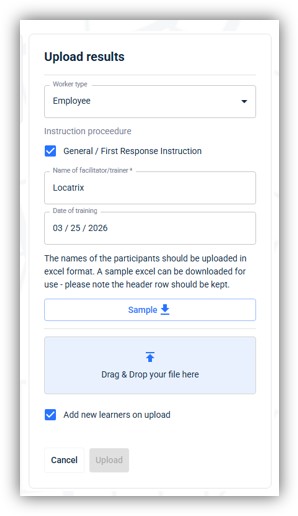
Classroom Uploads link to learner accounts! Now, when you upload Classroom results, and tick Add New Learners on upload, it will look for any learner accounts that have matching emails to what is entered into the spreadsheet:
If there is a learner account on PlanSafe with a matching email, it will add the assessment completion to their learner profile.
If there isn’t a learner account with a matching email, it will create a new account for that learner and add the completion to their newly created learner account.
New classroom uploads
Minor Improvements and Fixes
Updated the ECO Report to show building names.
Improved some session handling when opening PlanSafe in a new tab.
Added the ability to delete site plans in Campus settings.
Fixed a visual issue with icon states when setting floors as mandatory.
Added a job to clean up deleted documents on PlanSafe servers 24 months after deletion.
To support Portals development, the Campus map view has now been separated into its own menu item.
Performance improvements for ASPX menus.
Added icon bar support for enforced video watching.
You can no longer proceed to the next training slide if you failed your assessment.
Added monitoring for SMS credit balance.
Fixed a syncing issue caused by a building code having ‘flr’ in it.
Added the capability to remove users from the email block list via the email tab in learner account settings.
.png)